
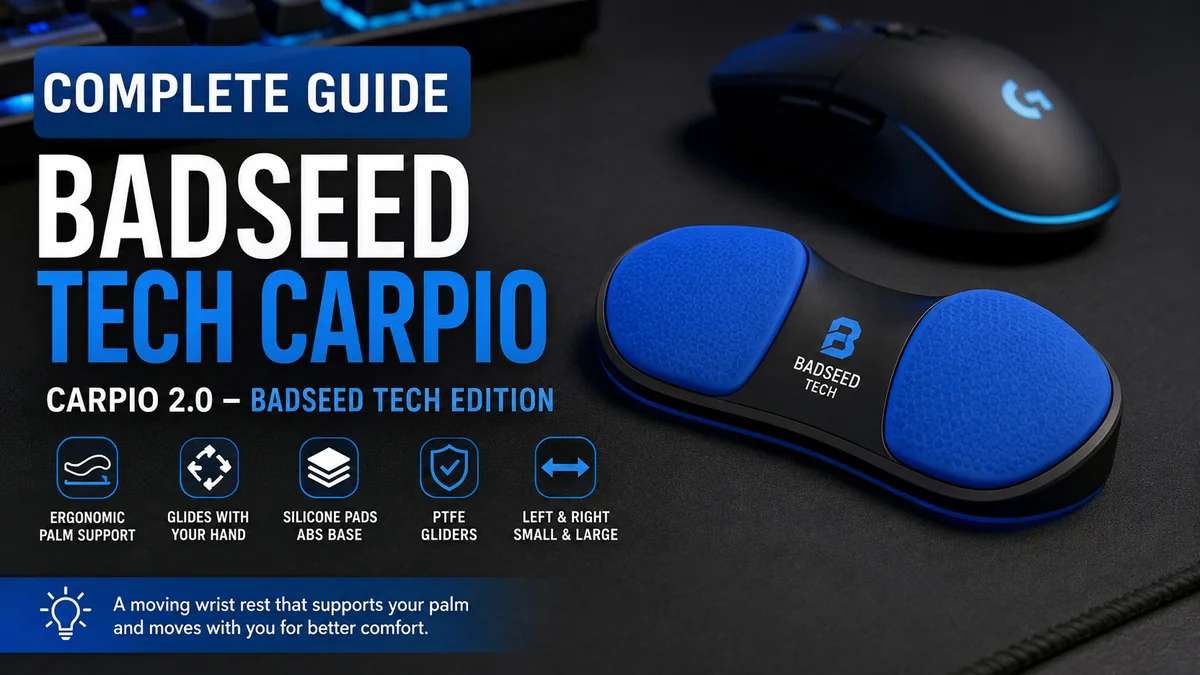

Long hours with a mouse can leave your wrist tired, uncomfortable, or simply begging for a better desk setup. Traditional wrist rests help when your hand is stationary, but they usually stay behind when you move the mouse.
That difference explains much of the interest surrounding badseed tech carpio, a special version of DeltaHub’s Carpio 2.0 designed to move underneath the palm while you work or play. Rather than introducing an entirely different ergonomic device, the collaboration combines the standard Carpio 2.0 platform with exclusive BadSeed Tech styling and replaceable pads.
Quick answer: The badseed tech carpio is a limited-edition version of the DeltaHub Carpio 2.0 ergonomic wrist rest. It uses silicone palm pads, an ABS base, and PTFE gliders so the support can travel with your hand during mouse movement while encouraging a more neutral wrist position.
What Is badseed tech carpio?
The badseed tech carpio is officially called the Carpio 2.0 – BadSeed Tech Edition. It is a creator collaboration built around DeltaHub’s existing Carpio 2.0 ergonomic wrist-rest platform.
That distinction clears up one of the biggest sources of confusion around the name.
It is not a completely separate wrist-support technology developed independently by BadSeed Tech. The underlying device is a Carpio 2.0. What makes this edition distinctive is its BadSeed Tech visual treatment and special replaceable pads.
DeltaHub currently describes the package as including:
- A black Carpio 2.0 with standard pads
- BadSeed Tech Special Edition replacement pads
- A choice between left- and right-hand versions
- Small and Large sizing options
The official product listing identifies its color as BadSeed Tech Blue.
This means that, from a functional perspective, understanding the BadSeed Tech edition starts with understanding how the regular Carpio 2.0 works.
How the badseed tech carpio Works
Most conventional wrist rests are stationary. You position one in front of a keyboard or mouse and rest your wrist or lower palm against it.
Carpio takes a different approach.
The device sits underneath the palm and is designed to glide across the desk as your hand moves. Its PTFE feet reduce friction, allowing the support to follow mouse movements rather than forcing the hand to repeatedly slide away from a fixed cushion.
Pressure Is Placed Under the Palm
One of Carpio’s most significant design ideas is where the support makes contact with your hand.
DeltaHub says Carpio is designed to shift pressure away from the sensitive carpal area and toward more resilient areas of the palm. The aim is to support a more natural wrist position rather than having the wrist itself pressed continuously against a desk edge or stationary rest.
That does not mean it should be treated as a medical device or a guaranteed treatment for wrist conditions. Ergonomic accessories can change positioning and comfort, but persistent pain, numbness, weakness, or tingling deserves appropriate medical evaluation.
The Wrist Rest Moves With Your Arm
Carpio’s gliding mechanism is what separates it visually and practically from an ordinary foam wrist rest.
When you move your mouse, the Carpio moves underneath your palm. Ideally, the hand, wrist, and forearm therefore move together more naturally instead of repeatedly pivoting from one fixed contact point.
This design can be particularly relevant for people who make frequent mouse movements, including:
- Office workers
- Video editors
- Programmers
- Designers
- Gamers
- Content creators
- Students
It may take some adjustment because the sensation is quite different from placing your wrist against a stationary cushion.
Quick Takeaway: Carpio is better understood as a small moving palm support than as a conventional stationary wrist cushion.
What Materials Are Used in Carpio 2.0?
The BadSeed Tech edition retains the material construction of the Carpio 2.0 platform.
According to DeltaHub, the main components are PTFE Teflon gliders, an ABS base, and silicone pads.
| Component | Main purpose |
|---|---|
| Silicone pads | Provide a softer contact surface for the palm |
| ABS base | Creates the rigid supporting structure |
| PTFE gliders | Allow the device to move smoothly across compatible surfaces |
| Replaceable pads | Allow the contact pads to be changed |
The combination matters because a mobile wrist support needs two seemingly contradictory characteristics: it has to provide enough structure to support the hand while producing little enough friction to move with it.
Why PTFE Feet Matter
PTFE is widely used for low-friction sliding surfaces, including mouse feet.
Putting similar material underneath Carpio allows it to glide alongside a computer mouse. DeltaHub specifically recommends surfaces such as neoprene or felt desk mats, while noting that surfaces suitable for a smoothly gliding mouse generally work well with Carpio too.
Surface choice can therefore noticeably affect the experience.
A dirty, rough, uneven, or highly textured desktop can create more resistance. A smooth desk mat generally provides more predictable movement.
badseed tech carpio vs Standard Carpio 2.0
A common question is whether the BadSeed Tech edition actually performs differently from a normal Carpio 2.0.
The core platform is the same.
The BadSeed Tech edition is based on Carpio 2.0 rather than being a separate ergonomic model. Its main distinction is the collaboration styling and special pads.
| Feature | BadSeed Tech Edition | Standard Carpio 2.0 |
| Core design | Carpio 2.0 | Carpio 2.0 |
| Gliding support | Yes | Yes |
| PTFE feet | Yes | Yes |
| Silicone contact pads | Yes | Yes |
| Small/Large sizing | Yes | Yes |
| Left/Right versions | Yes | Yes |
| Special collaboration styling | Yes | No |
| BadSeed Tech pads | Yes | No |
So, if you’re researching the two versions purely to understand ergonomics, there is no need to treat them as fundamentally different technologies.
The BadSeed Tech model makes more sense as a special edition of an existing product.
Carpio 2.0 vs Carpio G2.0
Another easy mistake is confusing Carpio 2.0 with Carpio G2.0.
DeltaHub currently positions Carpio G2.0 as the version designed especially for gaming, and its most obvious difference is a strap that helps keep the wrist rest attached to the hand during movement.
The regular Carpio 2.0—including the BadSeed Tech edition—does not depend on that strapped design.
That distinction can matter considerably in practice.
For regular productivity, editing, browsing, or slower mouse movements, an unstrapped support may feel less restrictive. Gamers making rapid movements may prefer the more secure relationship between hand and support offered by a strapped design.
Neither concept automatically makes one universally better. They address somewhat different movement patterns.
How to Choose the Correct badseed tech carpio Size
Correct sizing matters because your palm needs to land naturally on the support pads.
The official BadSeed Tech Carpio listing provides two dimensions:
- Small: 8.4 × 3.6 cm (3.3 × 1.4 inches)
- Large: 9.6 × 4.0 cm (3.8 × 1.6 inches)
Both left- and right-hand configurations are available.
Don’t assume that choosing the larger version automatically gives you more support.
The objective is proper contact with your palm. An oversized support can position the pads incorrectly just as an undersized one can feel cramped.
Left vs Right Matters Too
Carpio is hand-specific.
If you operate your mouse with your right hand, choose the right-hand version. Left-handed mouse users should select the left-hand version.
People considering Carpio for both hands—for example, one for keyboard work and another for mouse use—can also find paired configurations in DeltaHub’s broader Carpio range.
How to Use badseed tech carpio Correctly
The unusual design means positioning matters more than simply putting the accessory somewhere near your mouse.
DeltaHub’s instructions say to place the palm firmly on the silicone pads without pressing down excessively. The hand should then glide naturally with the Carpio. The company also recommends adequate elbow support from either the desk or the chair’s armrest.
A practical setup process looks like this:
- Place Carpio underneath your palm.
Let the padded areas support the appropriate parts of the hand. - Keep your wrist relatively neutral.
Avoid deliberately bending the wrist upward just to maintain contact. - Relax your hand.
You should not have to force your palm into the pads. - Move your mouse normally.
Allow Carpio to travel with your hand rather than trying to keep it stationary. - Support your forearm or elbow appropriately.
Good wrist positioning cannot compensate for an awkward overall desk posture. - Check mouse and desk height.
Your hand should not feel as though it is constantly climbing up or dropping down to reach the mouse.
This last point is easily overlooked.
An ergonomic accessory works within the larger workstation. Chair height, desk height, mouse shape, keyboard position, armrest placement, monitor position, and working habits all contribute to comfort.
Does Carpio Work With Every Mouse?
Carpio isn’t electronically connected to the mouse, so compatibility is less about the mouse model and more about hand position, height, movement style, and surface.
That makes it usable alongside many conventional productivity and gaming mice.
However, physical height can create an issue.
If your mouse or keyboard sits substantially higher than the Carpio, your hand may end up at an uncomfortable angle. DeltaHub offers Carpio Mods, which add height between the desk and Carpio when users need to better match their keyboard or mouse level.
This highlights a useful ergonomic principle: wrist support should not force the hand into extension simply because another desk accessory sits higher.
Is badseed tech carpio Good for Gaming?
It can be used for gaming, but the answer depends heavily on how you aim.
A gamer using controlled mouse movements may adapt to the gliding Carpio 2.0 design relatively easily. Someone who frequently lifts the mouse, performs rapid flicks, or uses very large sweeping movements may find an unstrapped support less predictable.
That is one reason the Carpio G2.0 exists. DeltaHub describes it as the strapped version and positions it specifically toward gaming.
For gamers evaluating the BadSeed Tech edition, consider:
Mouse Sensitivity
High-sensitivity users often make smaller movements, which can make keeping the palm positioned on the support easier.
Low-sensitivity players may use much larger arm movements across the mousepad.
Mouse Lifting
If you regularly lift and reposition your mouse, remember that an unstrapped Carpio doesn’t automatically lift with your hand.
Desk-Mat Space
Both your mouse and Carpio need sufficient room to glide.
A large, smooth mousepad or desk mat usually makes more sense than a tiny mousepad surrounded by a rough desktop.
Adjustment Time
Changing wrist or palm positioning can temporarily affect mouse control. Competitive players should expect an adaptation period rather than judging the accessory after a few minutes.
Ergonomic Benefits of the Carpio Design
Carpio’s primary appeal comes from combining support with movement.
It Doesn’t Anchor the Hand to One Spot
A stationary wrist rest can encourage users to keep one part of the hand planted while moving the mouse around it.
Carpio attempts to avoid that by moving with the hand.
It Encourages Arm Movement
DeltaHub describes the design as allowing users to move the whole arm rather than relying exclusively on wrist movement.
That can be useful because repetitive small movements from an awkward wrist position are exactly what many desk users are trying to reduce.
It Is Compact
Carpio is significantly smaller than a full-width keyboard wrist rest.
That makes it relatively easy to move between workstations or carry alongside a laptop and mouse.
The Contact Surface Is Soft
The silicone pads provide a softer interface between the palm and rigid supporting base.
It Can Glide Across Common Desk Mats
The PTFE feet are designed for low-friction movement, especially on compatible mouse and desk-mat surfaces.
Quick Takeaway: The defining benefit isn’t simply “more padding.” It is continuous palm support that moves instead of remaining fixed on the desk.
Limitations and Common Problems
A balanced look at badseed tech carpio also requires understanding what it cannot do.
There Is a Learning Curve
A moving wrist rest feels unusual at first.
People accustomed to planting their wrist directly on the desk may initially feel as though another object is interfering with mouse movement.
Giving yourself time to adapt is more realistic than expecting instant familiarity.
Surface Quality Matters
PTFE gliders work best when the surface allows smooth movement.
Dust, debris, deep desk textures, and worn mousepads can make movement less consistent.
Height Mismatches Can Affect Comfort
A tall mouse or keyboard can make the support feel too low. This is precisely why height-adjusting accessories such as Carpio Mods exist.
It Won’t Fix an Entire Workstation
Poor chair height, unsupported elbows, excessive reaching, badly positioned monitors, or long sessions without breaks can still create problems.
A wrist support is one part of an ergonomic setup—not a replacement for one.
It Isn’t a Medical Treatment
This point deserves emphasis.
Marketing around ergonomic products can easily blur the difference between supporting a better position and treating an injury. Carpio may improve comfort or positioning for some users, but that does not make it a treatment for carpal tunnel syndrome, repetitive strain injury, or another diagnosed condition.
Persistent symptoms should be evaluated appropriately.
Was Carpio Designed With Medical Input?
According to DeltaHub, medical experts were involved in Carpio’s development.
The company specifically identifies Dr. Marko Mikša, a specialist whose fields include plastic and reconstructive surgery and carpal tunnel surgery, as a contributor. DeltaHub says occupational-medicine physicians were also consulted during development.
The company describes a development process involving prototypes, 3D scans of hand molds, comparative MRI examinations, and feedback gathered from more than 20,000 users.
Those details help explain the design rationale, but they should not be interpreted as evidence that the product prevents or cures a specific medical condition.
Why Is BadSeed Tech Connected to Carpio?
The association comes from a creator collaboration.
DeltaHub identifies the product as the Carpio 2.0 – BadSeed Tech Edition and attributes a testimonial on the product page to Brian from BadSeed Tech. In that account, he describes initially being skeptical of Carpio before trying it after experiencing repetitive-strain problems and seeing the devices in use during a visit to Linus Tech Tips.
This is also why searches for the product can become confusing.
Some pages incorrectly interpret “Carpio” as a person’s surname associated with BadSeed Tech. The current official DeltaHub product information makes the relationship much clearer: Carpio is the wrist-rest product, while BadSeed Tech is the creator collaboration attached to this special edition.
How Does It Compare With a Traditional Wrist Rest?
The most useful comparison isn’t necessarily BadSeed Tech versus another Carpio color. It’s moving palm support versus stationary wrist support.
| Traditional Wrist Rest | Carpio 2.0 |
| Usually stays stationary | Moves with the hand |
| Often supports wrist/lower palm | Designed around palm support |
| Foam, gel, or similar cushioning common | Silicone pads over rigid structure |
| No sliding mechanism needed | Uses PTFE gliders |
| Often larger | Compact |
| Familiar immediately | May require adaptation |
| Common for keyboard use | Particularly relevant to mouse movement |
A conventional rest can still make sense if your hand remains mostly stationary, particularly during keyboard use.
Carpio becomes more interesting when you want the support itself to follow mouse movement.
How to Get Better Results From badseed tech carpio
The accessory works best when you treat it as part of the complete workstation rather than an isolated fix.
Start by checking your chair and desk.
Your shoulders should feel relaxed rather than raised toward your ears. Keep the mouse close enough that you aren’t constantly reaching forward. Give your forearm appropriate support without creating a hard pressure point at the edge of the desk.
Then look at your wrist.
You shouldn’t have to bend it sharply upward, downward, or sideways simply to operate your mouse. If Carpio creates an obvious height mismatch, reconsider the setup rather than forcing yourself to adapt to an awkward position.
Finally, keep the gliding surface clean.
Small particles underneath PTFE feet can change the way they move and may also increase wear on a desk mat.
These simple details often matter more in daily use than specifications on a product page.
Who Is the BadSeed Tech Carpio Best Suited For?
The design is particularly relevant to people who spend substantial time using a mouse and prefer support that moves with their hand.
That may include video editors spending hours moving through timelines, designers working in creative applications, programmers switching constantly between keyboard and mouse, office professionals working through long computer sessions, and gamers making repeated mouse movements.
It may be less appealing if you strongly prefer a completely stationary wrist cushion, frequently lift your hand away from the desk, dislike having anything beneath your palm, or expect an ergonomic accessory to solve an underlying medical problem by itself.
Personal comfort remains a major factor.
Two people with similar desk setups can react very differently to the same wrist support because hand dimensions, mouse grip, arm position, sensitivity settings, and movement habits vary considerably.
What Makes the BadSeed Tech Edition Different?
After stripping away the branding, the answer is fairly simple.
The special edition gives users the established Carpio 2.0 platform with exclusive BadSeed Tech pads and BadSeed Tech Blue styling. The functional foundation remains Carpio 2.0.
So someone researching the edition should focus first on three questions:
- Does the moving Carpio concept suit the way you use a mouse?
- Which size and hand orientation fit you correctly?
- Do you specifically value the BadSeed Tech collaboration design?
The first two affect everyday usability much more than the third.
Final Thoughts on badseed tech carpio
The badseed tech carpio is best understood as a limited-edition DeltaHub Carpio 2.0 rather than an entirely separate ergonomic product. Its key idea is straightforward: support the palm while allowing that support to glide with mouse movement.
Its silicone pads, ABS structure, PTFE gliders, left- and right-hand configurations, and Small and Large sizes all support that moving-rest concept. The BadSeed Tech edition then adds exclusive collaboration pads and its recognizable blue visual identity.
What makes Carpio interesting isn’t the branding alone. It’s the departure from the traditional stationary wrist-rest design.
For anyone researching it, the most useful next step is to evaluate your own hand size, mouse height, desk surface, grip style, and arm position. Those factors will tell you far more about whether Carpio’s approach makes sense for your setup than appearance alone.
