
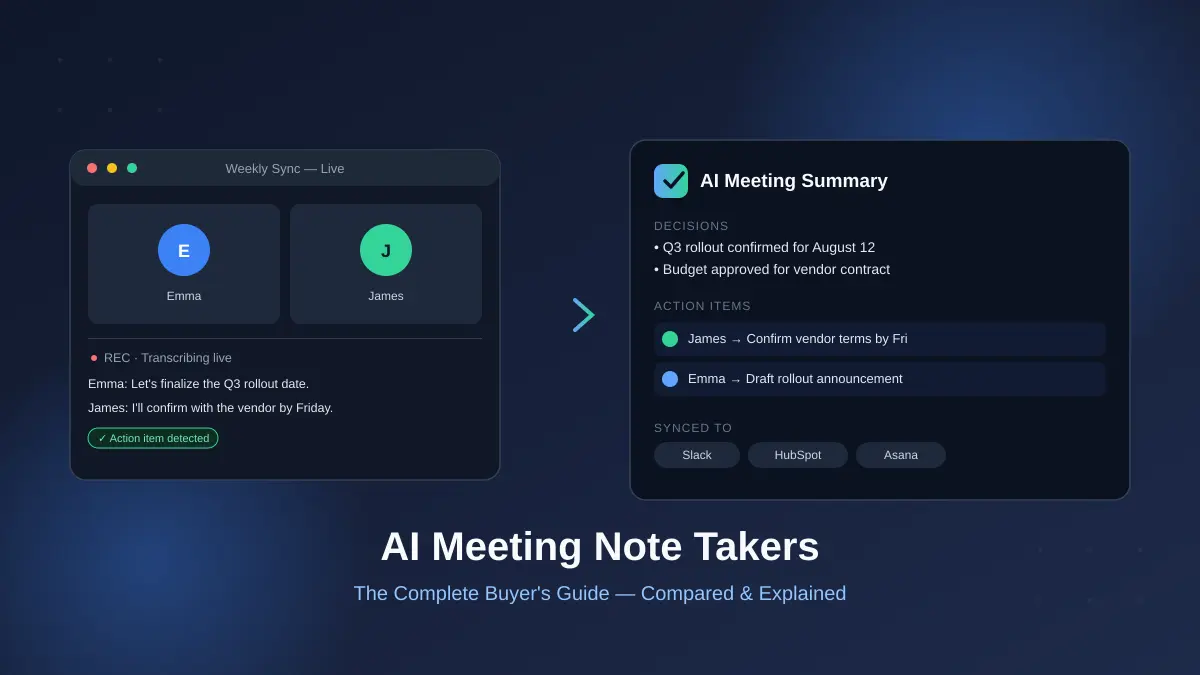

I sat in a client call last year, nodding along, “taking notes” — and walked away with four bullet points and zero memory of the actual decision we made. That’s the problem AI meeting note takers were built to solve. The question in 2026 isn’t whether they work. It’s which one, set up which way, without creating a bigger problem than the one you started with.
An AI meeting note taker is software that joins or listens to a meeting, transcribes what’s said, and generates a summary with action items — either by joining as a visible bot or capturing audio directly from your device. The best tools in 2026 also push those notes into your CRM, calendar, or task manager automatically, instead of leaving them stranded in a separate app.
What Is an AI Meeting Note Taker?
At the core, every AI meeting note taker does three things: capture audio, convert it to text, and turn that text into something usable — a summary, a list of decisions, a set of action items assigned to people.
Where they differ is everything downstream of that. Some tools stop at a clean transcript. Others identify who said what, tag decisions separately from small talk, and write a follow-up email in your voice before you’ve even left the call.
The professionals who rely on these tools most heavily spend a staggering amount of time in meetings to begin with — a widely cited Atlassian figure puts the average professional at roughly 31 hours a month in meetings, and separate research suggests people forget about half of what was discussed within a day. That’s the actual business case for these tools. It’s not novelty. It’s memory loss at scale.
Bot vs. Botless — The Decision That Actually Matters
This is the single biggest fork in the road, and most buying guides bury it under feature lists.
Bot-based note takers (classic Otter.ai, Fireflies) join your call as a visible participant — you’ll often see a name like “Otter Notetaker” sitting in the attendee list. They’re reliable for structured, scheduled meetings, but they announce themselves, which some clients and colleagues find intrusive.
Botless (bot-free) note takers — Granola, Jamie, Krisp, and increasingly Fellow and tl;dv — capture audio directly from your device instead of joining as a separate participant. Nothing shows up in the attendee list. For client calls, fundraising conversations, or any setting where a visible bot feels like overkill, this approach is quickly becoming the default expectation rather than a nice-to-have.
Why Google Meet Changed the Game in March 2026
Worth knowing before you commit to a bot-based tool: Google rolled out a change in March 2026 that puts third-party notetaker bots into a “potential risk” queue by default, requiring the meeting host to manually approve entry before the bot can join. That single policy shift makes bot-based tools noticeably less reliable specifically on Google Meet — botless capture or native desktop apps sidestep the problem entirely, which is part of why so many vendors have rushed out bot-free modes in the last year.
Quick takeaway: If most of your meetings happen on Google Meet, botless capture isn’t just a privacy preference anymore — it’s the more dependable technical choice.
How Accurate Are AI Meeting Transcripts, Really?
Transcription accuracy is the foundation everything else sits on. If a tool mishears a name or a number, the summary built on top of it is wrong too, and so is the action item that gets sent to someone’s task list.
In practice, accuracy across the leading tools sits around 90–98% for clean, single-speaker English audio, dropping into the 85–92% range once you add multiple speakers, accents, crosstalk, or technical jargon. Speaker diarization — correctly attributing each line to the right person — is where the gap between “good” and “genuinely useful” tools shows up most. A transcript that says “someone will follow up” is a lot less useful than one that says “Sarah owns the follow-up.”
Proper nouns and numbers are the classic failure point: a weaker engine can turn “Dr. Ramirez” into gibberish, and once that happens, the action item built on it is effectively broken. Testing a tool against a technical, name-heavy meeting before rolling it out to a team is a better predictor of real-world reliability than any accuracy percentage a vendor publishes.
The Best AI Meeting Note Takers in 2026, Compared
There’s no single “best” tool — the right pick depends heavily on whether you value privacy, integrations, price, or raw feature depth. Here’s how the major players actually stack up.
| Tool | Capture Method | Best For | Free Tier | Starting Paid Price |
|---|---|---|---|---|
| Fathom | Bot + botless | Solo users, generous free plan | Unlimited recordings | $19/user/mo (Teams) |
| Fireflies.ai | Bot | Teams needing 100+ language support and a large meeting archive | 800 min. storage | ~$10/user/mo |
| Granola | Botless only | Privacy-conscious individuals who like active note-taking | Limited | Paid plans vary |
| Otter.ai | Bot | Legacy familiarity, live transcription | Reduced minute cap | ~$16.99/mo |
| Fellow | Bot or botless (switchable) | Regulated industries needing SOC 2/HIPAA/GDPR | 5 AI recordings | $7/user/mo (Team) |
| tl;dv | Bot + native botless app | Teams wanting a generous free plan across Zoom/Meet/Teams | Unlimited video & transcripts | Paid tiers vary |
| Jamie | Botless | Privacy-first individuals, works offline too | Available | Paid tiers vary |
Fellow stands out for the full lifecycle rather than just the transcript: structured agendas beforehand, accurate notes during the call, and an “Ask Fellow” agent that can search across your entire meeting history afterward. It’s also one of the few tools in this category that’s SOC 2 Type II certified, HIPAA compliant, and GDPR compliant out of the box, with zero-day retention options for regulated teams.
Fathom wins on pure free-tier generosity — unlimited recordings at no cost is genuinely rare in this market, and its summaries and action items are fast and clean without a lot of feature bloat.
Fireflies leans into scale: a large integration ecosystem, support for over 100 languages, and an “AskFred” assistant for querying your entire meeting archive — a good fit if your team runs a high volume of calls and needs to search back through months of them.
Granola and Jamie both lean into the botless, privacy-first end of the market, appealing to people who’d rather nobody know an AI tool is involved at all.
Privacy, Consent, and the Legal Risk Nobody Reads the Fine Print On
This is the part most “best of” roundups skip entirely, and it’s arguably the most important section for anyone deploying these tools at a company rather than using them solo.
Recording a meeting is a data-processing activity under GDPR, and consent from the person who installed the tool does not automatically extend to everyone else on the call. In the US, the picture is patchwork: most states allow one-party consent, but eleven — including California, Illinois, and Pennsylvania — require all-party consent, meaning every participant has to agree before recording is legal.
This isn’t theoretical. Two active class-action cases — Brewer v. Otter.ai and Cruz v. Fireflies.AI — are testing exactly this question: whether the vendor or the individual user carries the burden of getting everyone’s consent. The Brewer complaint specifically alleges that recording began without obtaining prior consent from all attendees, only from the account holder.
A visible bot sitting in the participant list is not the same thing as legal consent, in any jurisdiction reviewed so far. Awareness that something is present isn’t the same as understanding what it does with your voice, where the data goes, or how long it’s kept — and that gap is exactly what regulators and courts are focused on.
For teams handling anything sensitive — HR conversations, legal matters, health-adjacent disclosures, client discussions — the practical baseline looks like this:
- Disclose before recording starts, every time.
- Confirm your vendor’s data residency (EU-based teams should look for EU server storage, not just an EU policy statement).
- Check whether the vendor trains its models on your transcripts by default — many freemium tools do unless you explicitly opt out.
- Verify SOC 2 Type II or equivalent certification if you’re in a regulated industry.
Quick takeaway: If you’re rolling this out beyond personal use, treat the consent and data-residency questions as a procurement requirement, not an afterthought — one class action already names the exact gap you’re trying to avoid.
READ MORE: Best AI Scheduling Assistants in 2026: 9 Tools Compared
What Happens After the Notes — The Part Most Reviews Skip
Transcription itself has effectively been commoditized — most serious tools now land in the 90%+ accuracy range. The real differentiation in 2026 has shifted to what happens once the meeting ends.
A transcript that sits in its own app, never touched again, isn’t actually solving the problem. The tools pulling ahead are the ones that push meeting output directly into the systems people already work in: updating a CRM field the moment a deal detail is mentioned, drafting a follow-up email referencing the specific decisions made, or creating a task in Asana or Jira without anyone copying and pasting.
This is also where AI agents are starting to blur the line between “note taker” and “assistant” — some newer tools don’t just summarize a meeting, they act on it: reading your calendar, identifying who was on the call, and drafting personalized follow-ups for each person based on what was actually agreed to.
If your team’s biggest bottleneck isn’t the notes themselves but everything that’s supposed to happen after them, weight your evaluation toward integration depth over transcript polish.
How to Choose the Right One for Your Team
A few honest heuristics, based on what actually differentiates these tools rather than marketing copy:
- Sales teams benefit most from deep CRM sync (Fireflies, Fellow, Laxis) since the value is in getting call details into the pipeline without manual entry.
- Solo users and freelancers are usually best served by a strong free tier (Fathom, tl;dv) rather than paying for enterprise features they won’t use.
- Regulated industries (finance, legal, healthcare) should filter first on compliance certifications — SOC 2 Type II, HIPAA, GDPR — and only then compare features.
- Privacy-sensitive or client-facing roles should default to botless capture regardless of platform, especially now that Google Meet actively discourages bot-based tools.
- Global or multilingual teams should prioritize language coverage — Fireflies’ 100+ language support is a real differentiator here versus tools limited to a handful of languages.
Where AI Note Takers Still Fall Short
Worth saying plainly, since most vendor-adjacent content won’t: these tools are good, not perfect.
- Accuracy still drops meaningfully with heavy accents, crosstalk, or dense technical jargon.
- Nuance gets lost — sarcasm, hedged commitments (“I’ll try to get to it”), and context that depends on tone rather than words often get flattened into overly confident summaries.
- A bot or capture tool changes how people talk. Research suggests a large share of professionals modify what they say when they know an AI is listening, which can quietly undermine the candor a meeting was supposed to produce.
- They don’t replace judgment. A tool can tell you what was said; it can’t tell you what should happen next, or catch the political subtext behind why someone agreed to something they clearly didn’t want to.
None of that makes them not worth using — it just means treating the output as a strong first draft of institutional memory, not a legal record of truth.
Where This Leaves You
AI meeting note takers have genuinely matured past the novelty phase — transcription is reliable enough now that the real decision is about privacy architecture and what happens after the call, not whether the tool can hear you correctly. Start by deciding whether bot or botless capture fits how you actually meet with people, confirm the vendor’s consent and data-retention practices match your risk tolerance, and then let integration needs — not feature lists — narrow the final pick. If you’re testing options, start with a free tier before committing a whole team to a paid plan.
IF THIS HELPED, CHECK OUT OUR FULL GUIDE HUB FOR EVEN MORE PLAIN-ENGLISH TECH ANSWERS.
FAQ Section
What is an AI meeting note taker?
It’s software that records or listens to a meeting, transcribes the conversation, and generates a summary with action items — either by joining the call as a visible bot or capturing audio directly from your device without appearing as a participant.
Are AI meeting note takers legal to use?
Generally yes, but consent requirements vary. Eleven US states require all-party consent before recording, and GDPR requires informed consent from everyone on the call, not just the person who installed the tool. Always disclose before recording.
How accurate are AI meeting transcripts in 2026?
Leading tools reach roughly 90–98% accuracy on clean, single-speaker English audio, dropping to about 85–92% with multiple speakers, accents, or technical jargon. Names and numbers remain the most common failure points.
What’s the difference between a bot and a botless note taker?
A bot-based tool joins your call as a visible participant, while a botless tool captures audio directly from your device with nothing appearing in the attendee list. Botless capture is increasingly preferred for privacy and now works more reliably on Google Meet after its 2026 bot-blocking update.
What’s the best free AI meeting note taker?
Fathom and tl;dv both offer genuinely unlimited free recording and transcription, making them the strongest picks for solo users or small teams not ready to pay.
Can AI meeting note takers update my CRM automatically?
Yes — tools like Fireflies, Fellow, and Laxis can push meeting details directly into Salesforce or HubSpot, and some can also draft follow-up emails and create tasks in tools like Asana or Jira without manual copying.
Do AI note takers train on my meeting data?
It depends on the vendor. Many free, consumer-grade tools use call data to train their models by default. Enterprise-grade tools typically offer zero-data-retention-for-training policies — always check before using a tool for confidential conversations.
Can I refuse to let an AI note taker record me?
Yes. Both hosts and attendees generally have the right to decline being recorded, and you can ask that a bot be removed from a meeting’s participant list.
